Products
Ansys Twin Builder Create and Deploy Digital Twin Models
Ansys Twin Builder is an open solution that allows engineers to create simulation-based digital twins with Hybrid Analytics
Overview
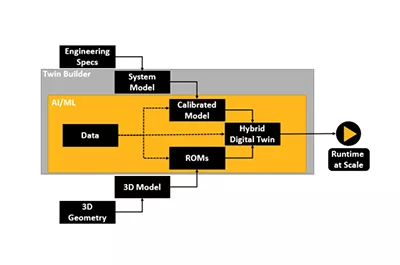
Build, Validate, Deploy and Scale Hybrid Digital Twin
An analytics-driven, simulation-based digital twin is a connected, virtual replica of an in-service physical asset — in the form of an integrated multidomain system simulation —that mirrors the life and experience of the asset. Hybrid digital twins enable system design and optimization and predictive maintenance, and they optimize industrial asset management. By implementing Ansys Twin Builder, you can improve top-line revenue, manage bottom-line costs and both gain and retain a competitive advantage.
- Build and Validate your Twin
- Runtime Capabilities for Your Twin
- Deploy Your Twin
- Scale your Twin
- Hybrid Analytics
Features
Quick Specs
Ansys Twin Builder enables you to quickly create a digital twin–a connected replica of an in-service asset. This allows for enhanced lifecycle management and true predictive maintenance, saving costs to help maintain a competitive advantage.
Still have a question?
Build and Validate System Models and Digital Twins
Easily Scale Deployment with IIoT Platforms
Hybrid Analytics
Deploy Digital Twins on IIoT Platforms
Flexible Licensing
Capabilities
Ansys Twin Builder creates connected, virtual replicas of an in-service physical asset
Ansys Twin Builder is a uniquely open solution that allows engineers to create digital twins–connected, virtual replicas of in-service physical assets. Digital twins enable true predictive maintenance, allowing for cost savings, and the proactive optimization of an asset’s operation. Ansys Twin Builder lets you build, validate and deploy the twin, potentially cutting the time required to create an accurate product model in half. Once deployed, users can expect a 25% increase in product performance, and maintenance cost savings of up to 20% over the product’s lifetime.
Capabilities
Key Features
Easily handle the complexity of varied design environments with a range of analytical tools that enable you to meet performance goals and ensure long-term reliability.
Multidomain Systems Modeler
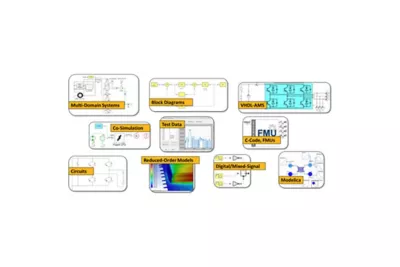
Multidomain Systems Modeler Compose your system using multiple domains and languages. Create hierarchical schematics of complex power electronic circuits and multidomain systems. Model with standard languages and exchange formats.
Create hierarchical schematics of complex power electronic circuits and multidomain systems. Model with standard languages and exchange formats.
Extensive 0D Application-Specific Libraries
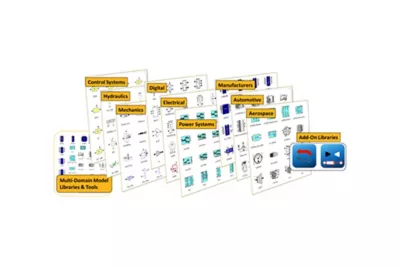
Extensive 0D Application-Specific Libraries Twin Builder’s built-in libraries provide a rich collection of components used to create complete system models.
Twin Builder models are easily parameterized to replicate physical component behavior. They include analog and power electronics components; control blocks and sensors; mechanical components; hydraulic components; digital and logic blocks; application-specific libraries for aerospace electrical networks, electric vehicles and power systems; and characterized manufacturers’ components. Twin Builder supports the Modelica Standard Library and Modelica libraries offered by Modelon AB, including libraries for hydraulics, pneumatics, liquid cooling, heat exchangers and thermal power.
Third-party Tool Integration
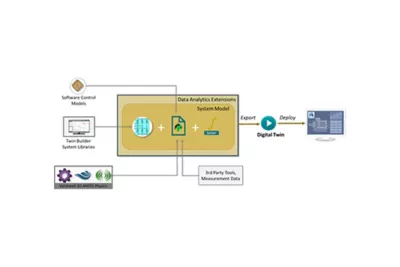
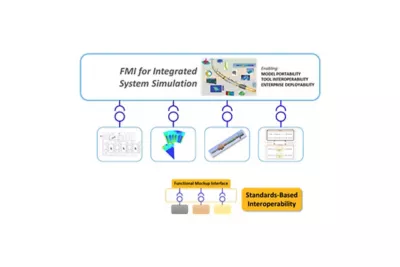
Third-party Tool Integration Twin Builder provides leading support for the Functional Mock-up Interface (FMI) standard, enabling you to combine models from a variety of sources into a full system description.
With over 100 tools now officially supporting FMI model export and cosimulation, including GT-SUITE, CarSim, Amesim and Dymola, full-system models can be assembled in Twin Builder to take advantage of its high-performing solvers and links with Ansys 3D physics. Additional interfaces allow the direct integration of C/C++ code and MathWorks Simulink models. Twin Builder models can also be exported for use in FMI-compliant environments.
Reduced Order Models (ROMs)
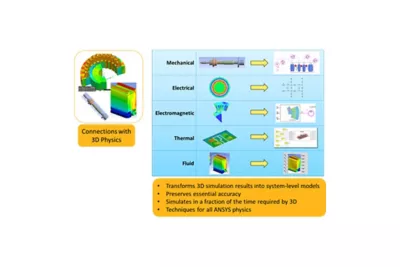
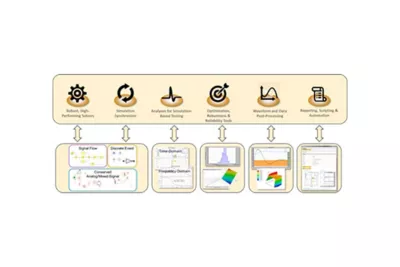
Reduced Order Models (ROMs) Twin Builder couples with Ansys’ physics-based simulation technology to bring the detail of 3D simulations, as reduced order models (ROMs), into the systems context to generate accurate and efficient system-level models.
Twin Builder uses ROMs produced from Ansys structural, fluids, electromagnetics and semiconductor products to model mechanical assemblies; electromagnetic actuators and machines; circuit and cable parasitics; thermal networks; and signal integrity. 3D ROMs can be created in Workbench and imported into Twin Builder. ROMs can also be imported from a variety of third-party tools, such as optiSLang. Co-simulation with 3D physics solvers preserves the full accuracy of FEA and CFD for modeling fluid components and flow networks, rigid and flexible-body mechanical assemblies, and electric machines and actuators. Get an easier access to all ROMs in one easy place with the ROM ribbon and gallery.
Embedded Software Integration
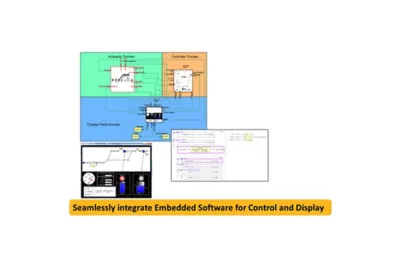
Embedded Software Integration Twin Builder readily integrates embedded control software and HMI design to support model-in -the-loop and software-in-the-loop flows for testing the performance of embedded controls with models of the physical system.
Tight coupling with Ansys SCADE Suite and SCADE Display permits interactive monitoring and debugging during software execution. Custom code and third- party controls can be incorporated into a Twin Builder system model through standard interfaces (e.g., FMI) or a robust API.
Multidomain Systems Solver with Integrated Post-Processing
Multidomain Systems Solver with Integrated Post-Processing Twin Builder solver technology has been proven through decades of industrial use for multidomain system simulation.
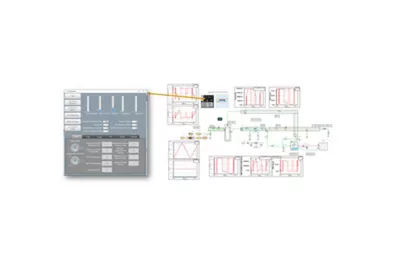
With adaptive time-step controls and sophisticated solver synchronization capabilities, Twin Builder performs efficient and accurate simulation of continuous-time, discrete-time and analog/mixed-signal behaviors. Twin Builder simulations can be executed on high-performance compute resources, and multi-run analyses can be executed in parallel to increase simulation throughout.
Rapid HMI Prototyping
Rapid HMI Prototyping Twin Builder includes a rapid prototyper that enhances the simulation experience with powerful, easy-to-design, interactive graphical panels.
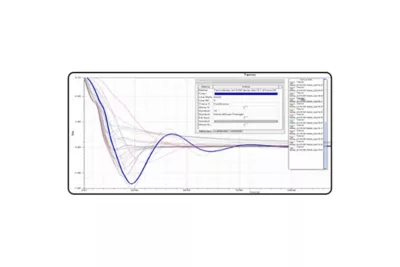
This enables you to create interactive panels using predefined widgets (buttons, sliders, etc.) to interact with the application under test. It empowers model simulation. Early requirements validation is made possible through a variety of features.
System Optimization
System Optimization System performance can be optimized based on cost functions of specified design variables, using built-in algorithms or in connection with Ansys DesignXplorer and Ansys optiSLang.
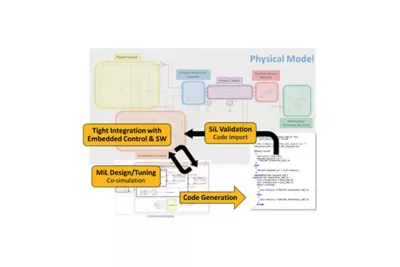
Twin Builder provides a full environment for testing system behavior, allowing basic simulation experiments to be performed in the steady-state, time and frequency domains.
XIL Integration
XIL Integration Different techniques exist in Twin Builder for integrating software with a physical model, including: cosimulation for model-in-the-loop (MiL) design and tuning of control strategies, and code import for software-in-the-loop (SiL) validation of the real embedded code in the virtual system.
Twin Builder provides links with popular embedded control design tools, including the Ansys SCADE tool suite and MathWorks Simulink.
IIoT Connectivity and Twin Verification and Validation (V&V)
IIoT Connectivity and Twin Verification and Validation (V&V) With Twin Builder, you can easily connect your digital twin to various IIoT platforms, to access test and real-time data.
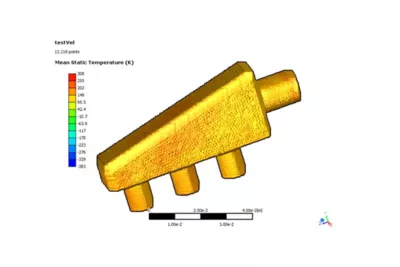
Twin Builder’s built-in APIs provide seamless connection to Microsoft® Azure® IoT, Microsoft Azure Digital Twins , PTC ThingWorx®, SAP Predictive Asset Insights, Rockwell Automation Emulate 3D and Rockwell Studio 5000. Twin Builder can also connect to all other IIoT platforms, including homegrown varieties, allowing you to perform predictive maintenance on your physical asset. You can also easily deploy digital twins with Ansys Twin Deployer. Twin Deployer helps you significantly reduce deployment time by performing V&V on twins, and easily deploying the twin using cloud, edge or offline computing resources. Twin Builder also supports generating images from deployed twins.
Twin Deployer
Twin Deployer Ansys Twin Deployer allows performing validation and verification on Digital Twins to significantly reduce deployment time.
User can build their dedicated library in Twin Deployer to easily reuse and manage your most common components. Easily perform parametric sweeps studies on twin and FMUs in Twin Deployer. With Ansys Twin Deployer, Inspect 3D visualizations with ROM Viewer during simulation, thanks to ROM visualization generation capability.
Hybrid Analytics
Hybrid Analytics Calibrate and tune your simulation model parameters by combining physical and virtual sensors to match data with your simulation outputs.
Fusion Modeling, a new capability to Twin Builder Hybrid Analytics, accurately models the residual between model and prediction, allowing users to capture and include any remaining or missing physics into the digital twin.
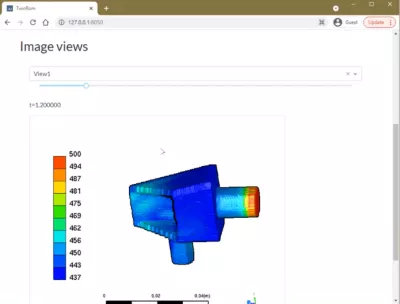
Export Web App from Twin Deployer
Export Web App from Twin Deployer Develop quick web application prototype by exporting Web App from Twin Deployer.

- View and interact with simple web application to run simulation on a browser
- View embedded 3D images and ROM visualizations on a browser
- Easily scale web application to production by refining available source code
Visioneering
Recent Events &
Webinars
Discover how engineering simulation is expanding across the entire product lifecycle.
Ansys Multiphysics
Conference
Join us on Saturday, June 10th, 2023, at 3 PM. The event will take place at Riverside Park, 123 River Lane, Springfield.
Blog
Future Tech Expo 2025
Join us on Saturday, June 10th, 2023, at 3 PM. The event will take place at Riverside Park, 123 River Lane, Springfield.
Blog
Innovative Simulations
Summit 2025
Join us on Saturday, June 10th, 2023, at 3 PM. The event will take place at Riverside Park, 123 River Lane, Springfield.
Innovative Simulations
Summit 2025
Join us on Saturday, June 10th, 2023, at 3 PM. The event will take place at Riverside Park, 123 River Lane, Springfield.
Ansys Multiphysics
Conference
Join us on Saturday, June 10th, 2023, at 3 PM. The event will take place at Riverside Park, 123 River Lane, Springfield.
Blog
Innovative Simulations
Summit 2025
Join us on Saturday, June 10th, 2023, at 3 PM. The event will take place at Riverside Park, 123 River Lane, Springfield.
Visioneering
Blogs & Trends
Discover how engineering simulation is expanding across the entire product lifecycle. engineering / product design analysis by modeling & simulation.

Introduction Mi tincidunt elit, id quisque ligula ac diam, amet. Vel etiam suspendisse morbi eleifend faucibus eget vestibulum felis. Dictum quis montes, sit sit. Tellus aliquam enim urna, etiam. Mauris
Introduction Mi tincidunt elit, id quisque ligula ac diam, amet. Vel etiam suspendisse morbi eleifend faucibus eget vestibulum felis. Dictum quis montes, sit sit. Tellus aliquam enim urna, etiam. Mauris
Introduction Mi tincidunt elit, id quisque ligula ac diam, amet. Vel etiam suspendisse morbi eleifend faucibus eget vestibulum felis. Dictum quis montes, sit sit. Tellus aliquam enim urna, etiam. Mauris
Introduction Mi tincidunt elit, id quisque ligula ac diam, amet. Vel etiam suspendisse morbi eleifend faucibus eget vestibulum felis. Dictum quis montes, sit sit. Tellus aliquam enim urna, etiam. Mauris
Innovate
Breaking News & White Paper
Discover how engineering simulation is expanding across the entire product lifecycle.
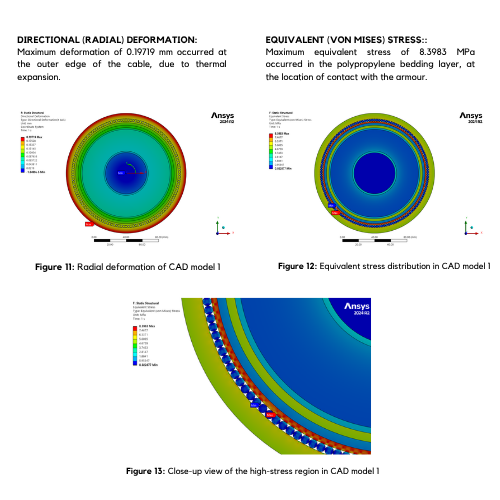
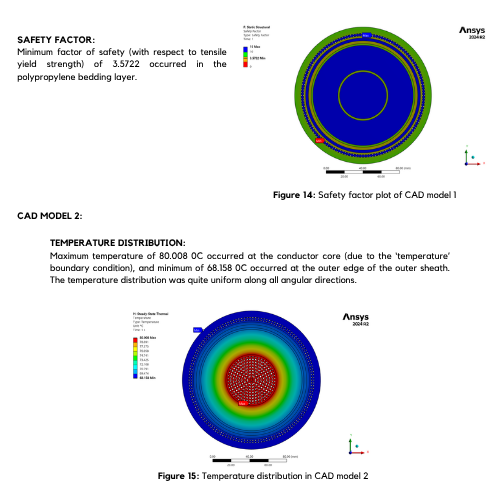
Smart Strategies for Large Structural Simulations
One way to gauge the progress of engineering simulation software is through the lens of size. Engineers today routinely run structural simulations with a few million degrees of freedom, and the largest commercial structural simulations have topped even 100 million degrees of freedom.
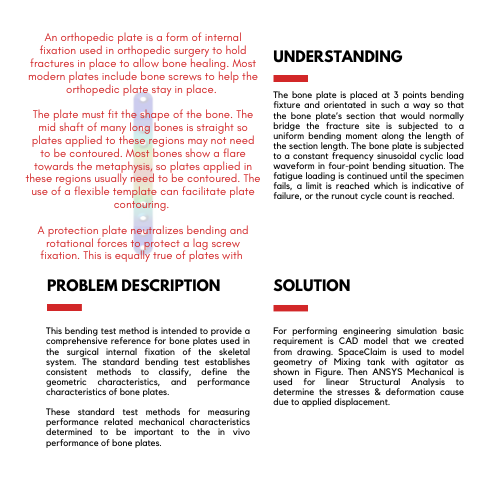
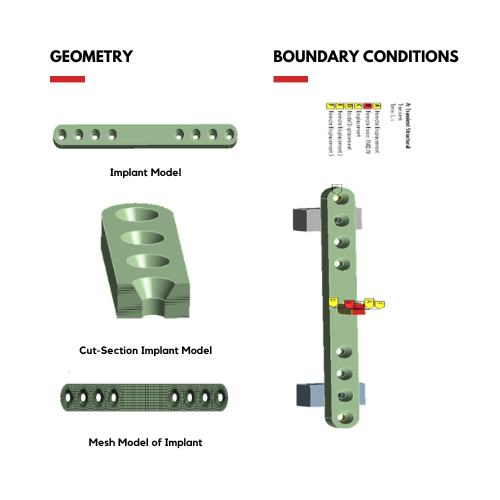
Introduction Mi tincidunt elit, id quisque ligula ac diam, amet. Vel etiam suspendisse morbi eleifend faucibus eget vestibulum felis. Dictum quis montes, sit sit. Tellus
Studies
Case
Explore Case Studies
Qantur Technologies is a pioneer engineering simulations company based in Gurgaon –India. We provides expert Computer Aided Engineering – CAE consulting services for engineering / product design analysis by modeling & simulation.
Download Case Study
Transform Ideas into Reality—Explore Our Simulation Solutions Today!
Partner with Us to Revolutionize Engineering Excellence!
Testimonials
Customer Testimonials
Bengal Industries Pvt. Ltd
Highly informative ANSYS Mechanical training resolved contact, meshing, fatigue challenges, delivered professionally with structured sessions and dependable post-sales support.
Sneha Iyer — Simulation & Validation Lead
Strong CFD expertise and reliable consulting achieved high accuracy, building confidence and establishing a preferred partnership for complete ANSYS simulation solutions.
Aditya Rao — Senior FEA Specialist
Insightful ANSYS training enhanced analytical skills through expert guidance in FEA, CFD, geometry, meshing, and modeling for students and faculty.
Nikhil Bansal—Product Engineering
Outstanding ANSYS implementation and consulting delivered timely FEA and CFD support, strengthening team capabilities through structured, high-value training sessions.
Ananya Mehta — CAE Project Lead
Advanced ANSYS HPC and CFD solutions enabled effective hydro turbine simulations, supported by expert training, technical guidance, and reliable support.
Saurabh Joshi — Senior Mechanical Engineer
Customized SpaceClaim training with hands-on workshops improved modeling skills, supported by proactive guidance, tailored sessions, and strong application engineering expertise.
Pooja Shah — CFD & Thermal Analysis Lead
Advanced drone development benefited from ANSYS expertise, delivering effective FEA and CFD solutions, training, and support for complex engineering challenges.
Manish Gupta — Engineering Analysis Manager
Innovation in autonomous drones improved through ANSYS implementation, expert FEA, CFD consulting, and training for better validation, performance, and efficiency.
Arjun—Head – Engineering Analysis
Significant R&D improvements achieved through ANSYS expertise, accelerating validation, optimizing performance, and solving complex engineering challenges with expert support.
Rahul Mittal — Head of R&D
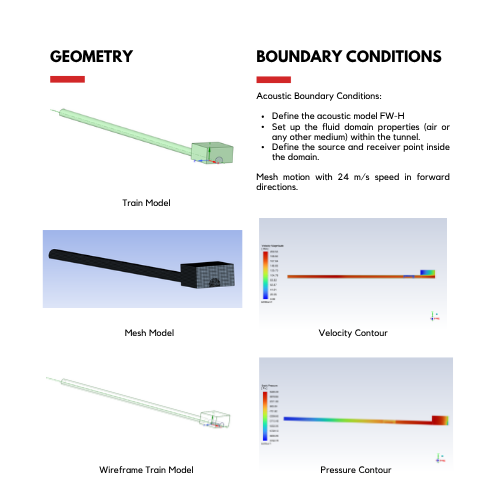
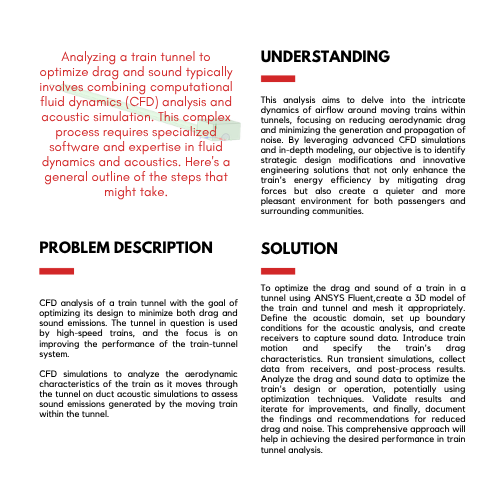
Rail solutions enhanced using ANSYS ICEPAK and Mechanical, delivering expert training, strong FEA, CFD support, and deeper understanding of core physics.
Vikram Sharma — Lead Engineer – Simulation
Responsive CFD support and training enabled faster validation, solving meshing challenges and strengthening R&D team’s simulation and design capabilities effectively.
Neha Kapoor — Manager – R&D
Reliable ANSYS implementation and FEA expertise delivered consistently under challenging conditions, demonstrating professionalism, technical strength, and strong project commitment.
Arjun Mehta — Senior Simulation Engineer
Engineering capabilities improved with ANSYS Mechanical expertise, optimizing components through hands-on training, prompt support, and strong FEA knowledge application.
Rohan Malhotra—Engineering Manager–CAE
Exceptional ANSYS expertise combining LS-DYNA and Mechanical training, supported by proactive guidance, solving complex challenges with professionalism and customer-focused collaboration.
Priya Nair — Lead CFD Engineer
Informative ANSYS Mechanical training enhanced analytical skills, delivered smoothly with strong coordination, structured sessions, and excellent trainer support throughout program.
Amit Verma — Senior Design Engineer
ANSYS FEA and CFD expertise improved product reliability, optimization, and efficiency through strong consulting, implementation, training, and dedicated technical support.