Products

Ansys ModelCenter for MBSE & Engineering Workflow Automation

Automate multi-tool workflows, link requirements to simulation and optimize complex systems with an integrated MBSE-driven engineering environment.
Overview

Unlock The Promise Of MBSE Automate any engineering analysis tool to a digital thread

Automate the execution of any software tool, such as Ansys LS-Dyna, MathWorks MATLAB®, Microsoft Excel®, MSC Nastran®, PTC Creo®, and many more. Integrate these tools to create automated engineering workflows and build a workflow library. Leverage high-performance computing to ask “what-if” questions to perform trade studies. Connect all of it to a systems architecture model to enable Model-Based Systems Engineering (MBSE).

Features

Quick Specs

ModelCenter simplifies engineering workloads by automating repeatable tasks and creating direct links between engineering tools and requirements. Users have gone from a few simulations per day to hundreds. Organizations can now shift resources left, reducing developmental costs while accelerating the time-to-market.

Still have a question?

Early Concept Design Exploration

Integrate MBSE to Analysis & Simulation

Automate Any Tool

Open Architecture

Behavioral Simulation

Easy-to-create Engineering Workflows

Automatically Execute Workflows

Make Better Decisions

Explore Trade-Offs

Identify Problems Early

Increase Collaboration

Model as a Service

Capabilities

Model-Based Engineering processes require an intuitive, flexible and open framework

ModelCenter implements Model-Based Engineering processes flexibly. With ModelCenter, engineers can create and maintain a library of modeling and simulation tools and engineering workflows. You’ll automatically execute the workflows, leverage high-performance computing resources to perform trade studies, and ask “what-if” questions. Best of all, these workflows connect to a systems architecture model to perform Model-Based Systems Engineering (MBSE).

Capabilities

Key Features

Drive innovation and improve product quality by enabling users to thoroughly explore and understand design alternatives, make better decisions, and find optimal solutions.

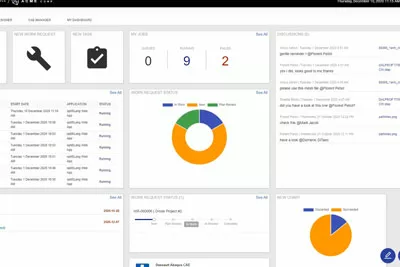
ModelCenter provides a graphical user interface for executing the connected ModelCenter workflow. Analysis results can be used to check requirements conformance, with unsatisfied requirements automatically highlighted. Trade studies can evaluate different design configurations and optimize the system design. New design configurations can update the systems model.
 

ModelCenter permits engineers to connect any analysis to behavioral diagrams created using NoMagic MagicDraw/Cameo or PTC Windchill Modeler. The integrated model (behavioral diagram plus analysis) results in a high-fidelity system simulation allowing engineers to accurately VERIFY system behavior and performance early in the design cycle, reducing costs and designing better products.
ModelCenter provides users with tools and methods that allow them to automate the execution of any modeling tool. Examples include user-created tools and scripts, legacy FORTRAN/C++ programs, spreadsheets, mathematical models, databases, and Computer-Aided Design (CAD) and Computer-Aided Engineering (CAE) models.

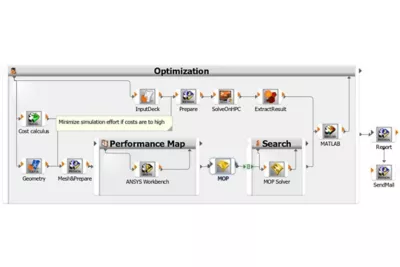
Once a few software tools are automated, ModelCenter’s drag-and-drop graphical user interface can be used to assemble these tools into a complete engineering workflow. An engineering workflow specifies the order and conditions of how and when to automate the tools. Like flowcharts, workflows can contain branches, if-then statements, loops, etc. Execute the workflow – automatically.

ModelCenter’s Link Editor allows you to specify the data transferred from one tool to the next when the workflow executes. Your workflow may contain tools that run on any number of different computers and operating systems.

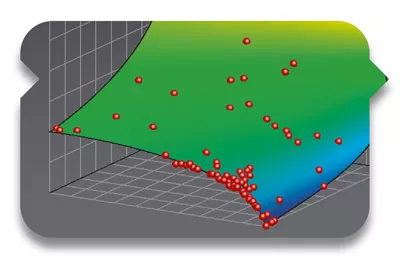
Analysis and trade-study results can be used to significant trends and trade-offs. Once a repeatable engineering analysis process is created, engineers can repeatedly execute the process (using parallel computing resources if available). Each execution corresponds to a different set of inputs. Engineers can explore and quantify the performance, cost, reliability, and risk of many various design alternatives in a relatively short time.

Visioneering

Recent Events &
Webinars

Discover how engineering simulation is expanding across the entire product lifecycle.

Ansys Multiphysics
Conference

Join us on Saturday, June 10th, 2023, at 3 PM. The event will take place at Riverside Park, 123 River Lane, Springfield.

Blog

Future Tech Expo 2025

Join us on Saturday, June 10th, 2023, at 3 PM. The event will take place at Riverside Park, 123 River Lane, Springfield.

Blog

Innovative Simulations
Summit 2025

Join us on Saturday, June 10th, 2023, at 3 PM. The event will take place at Riverside Park, 123 River Lane, Springfield.

Innovative Simulations
Summit 2025

Join us on Saturday, June 10th, 2023, at 3 PM. The event will take place at Riverside Park, 123 River Lane, Springfield.

Ansys Multiphysics
Conference

Join us on Saturday, June 10th, 2023, at 3 PM. The event will take place at Riverside Park, 123 River Lane, Springfield.

Blog

Innovative Simulations
Summit 2025

Join us on Saturday, June 10th, 2023, at 3 PM. The event will take place at Riverside Park, 123 River Lane, Springfield.

Study
Case

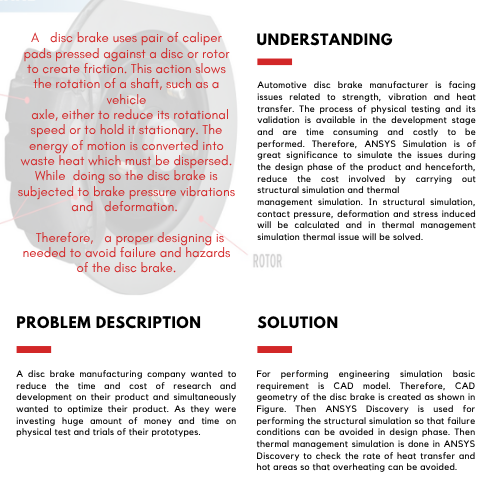
Explore Case Studies

Discover how Qantur Technologies applies advanced CAE, simulation, and engineering expertise to solve real-world design challenges, optimize product performance, reduce development cycles, and deliver measurable engineering outcomes across industries.
Innovate

Events &
white paper

Discover how engineering simulation is expanding across the entire product lifecycle.

Smart Strategies for Large Structural Simulations

One way to gauge the progress of engineering simulation software is through the lens of size. Engineers today routinely run structural simulations with a few million degrees of freedom, and the largest commercial structural simulations have topped even 100 million degrees of freedom.

Many Indian engineering organizations start simulation with one software license and one engineer. As adoption grows, simulation becomes an organizational capability rather than an individual

India’s aerospace and defence sector is increasingly focused on indigenous development, advanced manufacturing, propulsion, electronics and system-level engineering. Simulation can significantly reduce development risk because

Engineering companies across India are increasingly using simulation earlier in the product-development cycle to reduce physical prototyping, improve product quality, accelerate validation and shorten engineering

Visioneering

Blogs & Trends

Discover how engineering simulation is expanding across the entire product lifecycle. engineering / product design analysis by modeling & simulation.

Transform Ideas into Reality—Explore Our Simulation Solutions Today!

Partner with Us to Revolutionize Engineering Excellence!

Testimonials

Customer Testimonials

Fill out the form below, And you will get the details on Email


      Fill out the form below, And you will get the details on Email